Back to Templates


⚠️ Notice:
This workflow uses the CustomJS Invoice Generator node from customjs.space, which requires a self-hosted n8n instance and a CustomJS API key.
Google Spreadsheet → Invoice Generation → Email Workflow
This workflow demonstrates how to:
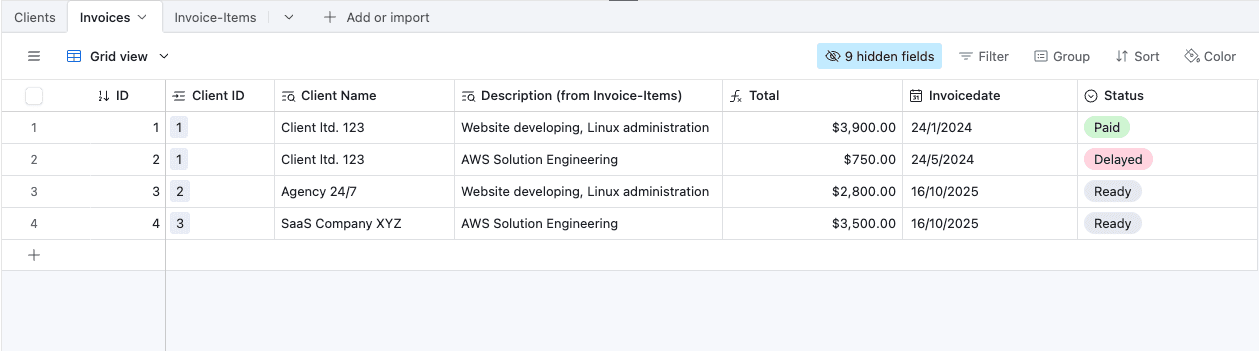
- Pull invoices ready to be sent from Airtable.
- Retrieve client details and invoice items from Airtable.
- Generate a professional invoice PDF using CustomJS Invoice Generator.
- Send the completed invoice via email to the client.
- Update the invoice status in Airtable automatically.
Workflow Overview
1. Trigger Workflow
- Node:
When clicking ‘Execute workflow’(Manual Trigger) - Starts the workflow when executed manually in n8n.
2. Get Ready Invoices
- Node:
Get Ready Invoices(Airtable) - Retrieves all invoices from Airtable where
Status = 'Ready'.
3. Loop Over Items
- Node:
Loop Over Items(Split In Batches) - Processes each invoice individually.
4. Get Clients
- Node:
Get Clients(Airtable) - Fetches client details for the current invoice:
- Name
- Address
- Tax ID
5. Get Invoice Items
- Node:
Get Invoice Items(Airtable) - Retrieves all items associated with the invoice and passes them for aggregation.
6. Map Fields
- Node:
Map Fields(Set) - Maps the invoice items into a structured format for the invoice generator:
- Description
- Quantity / Hours
- Unit Price
- Invoice ID
7. Aggregate
- Node:
Aggregate - Aggregates all invoice items into a single JSON array for the invoice.
8. Set Company Details
- Node:
Set Company Details(Set) - Defines issuer and payment information:
- Company Name
- Address
- Tax ID
- Email & Phone
- Bank Details
9. Generate Invoice
- Node:
Generate Invoice(CustomJS Invoice Generator) - Generates a PDF invoice using all collected data:
- Issuer / Company information
- Recipient / Client information
- Invoice items
- Billing information (Invoice number, date, currency, tax, notes)
10. Send Email With Attachment
-
Node:
Send Email With Attachment(Email Send) -
Sends the generated invoice PDF to the client:
-
From:
{{ $json.InvoiceEmail }} -
Subject:
Your Invoice for Last Month -
Body Text:
Hello,

Please find attached your invoice for the last month. Thank you very much for your cooperation.

Best regards,
Henrik
-
-
Uses SMTP credentials for sending emails.
11. Update Record
- Node:
Update record(Airtable) - Marks the invoice as
Sentin Airtable.
Requirements
- Self-hosted n8n instance
- CustomJS API key
- SMTP credentials
- Airtable API key and base access