Back to Templates


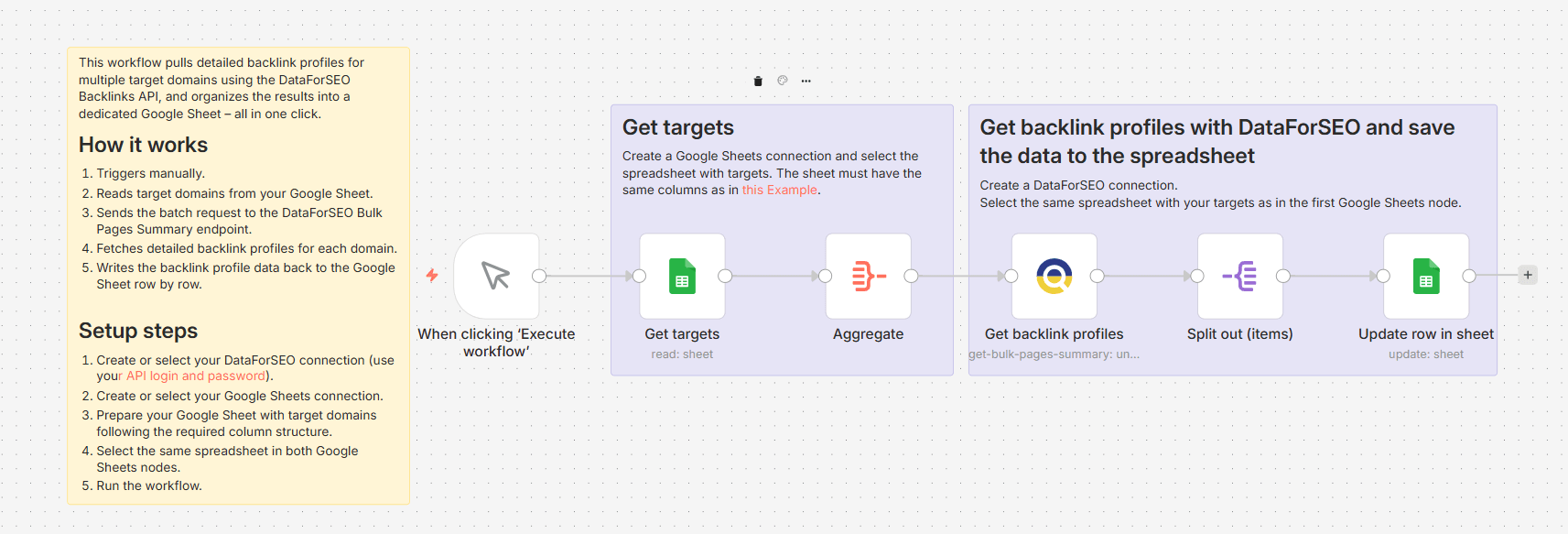
This workflow helps you retrieve backlink profile data for a large list of domains without running separate audits for each one.
On each manual run, the workflow reads your target domains from a Google Sheet and sends them as a batch request to the DataForSEO Bulk Pages Summary endpoint, which returns a comprehensive backlink overview for up to 1000 domains in a single call. For each domain, the workflow retrieves key backlink metrics, including the total number of backlinks, referring domains, domain rank, spam score, and more. After that, the results are mapped directly back to your spreadsheet.
The result is a fast, scalable backlink analysis system that lets you analyze entire domain lists in seconds and keep your data organized without manual exports.
Who's it for
This workflow is perfect for SEO experts, link-building specialists, and digital agencies who need to quickly and at scale audit and compare backlink profiles across multiple domains.
What it does
This workflow automatically retrieves a full backlink summary for a list of domains specified in a Google Sheet and writes the results back to the spreadsheet. The retrieved backlink data includes backlink count, referring domains, domain rank, spam score for each target, and more.
How it works
Triggers manually whenever you want to run a bulk backlink profile analysis.
Reads the list of target domains from your Google Sheet.
Aggregates all domains into a single batch request.
Sends the request to the DataForSEO Bulk Pages Summary endpoint and retrieves backlink profile data for each domain.
Writes the data back to the corresponding rows in your Google Sheet.
Requirements
- DataForSEO account and API credentials
- Google Sheets integration connected to n8n
Customization
You can customize this workflow by adjusting which backlink metrics are written to the sheet, switching from domain-level to page-level or subdomain-level analysis, increasing or reducing the batch size, adding filters based on spam score or domain rank, or scheduling the workflow to run automatically at regular intervals.